Date: 22/02/2026 11:51:10
From: Woodie
ID: 2363079
Subject: Anyone got Starlink internet?
My webernets using Skymesh and Skymuster satellite is goin’ ion the dam.
There are TWO Starlink services. Direct with Starlink and via Telstra.
Stuff that it’s Elon Musk, I’m not gunna suffer shit internet anymore.
Date: 22/02/2026 11:53:19
From: Divine Angel
ID: 2363081
Subject: re: Anyone got Starlink internet?
Date: 22/02/2026 12:05:23
From: Woodie
ID: 2363084
Subject: re: Anyone got Starlink internet?
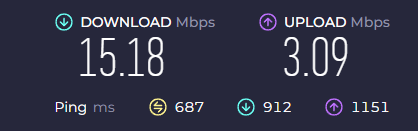
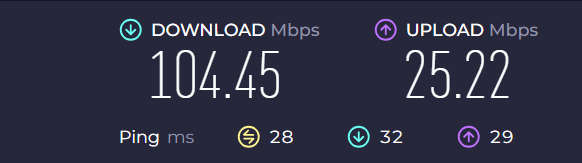
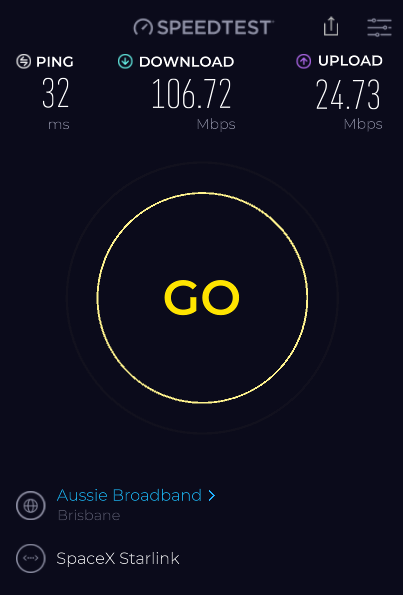
Current Skymesh speed test.
Supposed to be 25Mbps down 5Mbps up.
Note the “ping”
$70.71 per month
Date: 22/02/2026 12:09:28
From: Woodie
ID: 2363087
Subject: re: Anyone got Starlink internet?
Now…. on to Starlink
Speeds*
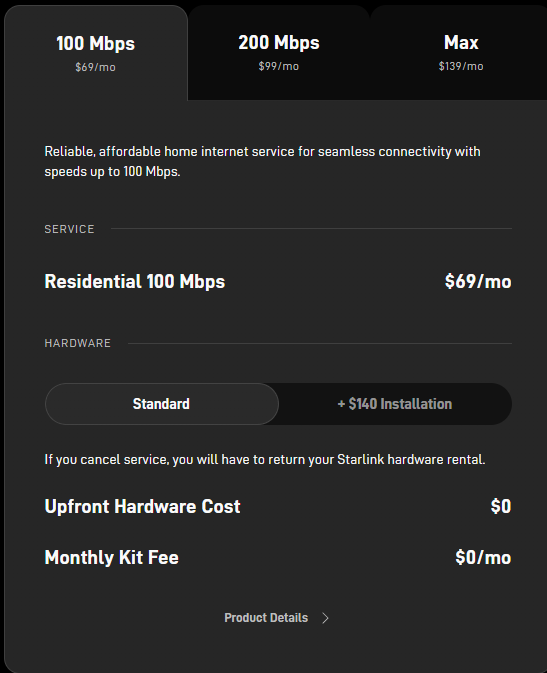
Download Speeds: Up to 100 Mbps (typically 80-100 Mbps)
Upload Speeds: 15-35 Mbps
$69 per month.
Date: 22/02/2026 12:19:00
From: Woodie
ID: 2363088
Subject: re: Anyone got Starlink internet?
Selectable (mouse click on map) performance of Starlink at my address:
Download 190 – 327 Mbps (I’ll select 100Mbps)
Upload – 30 – 50 Mbps
Latency (ping) 22 – 28 ms
Date: 22/02/2026 12:21:40
From: Michael V
ID: 2363091
Subject: re: Anyone got Starlink internet?
Woodie said:
Selectable (mouse click on map) performance of Starlink at my address:
Download 190 – 327 Mbps (I’ll select 100Mbps)
Upload – 30 – 50 Mbps
Latency (ping) 22 – 28 ms
Sounds OK. Price is OK, too. Cheaper than Telstra.
Date: 22/02/2026 12:30:45
From: Woodie
ID: 2363098
Subject: re: Anyone got Starlink internet?
So let’s compare the pair.
Skymesh price – $70.71 per month – Starlink – $69 per month
Skymesh speed Supposed to be 25Mbps (get 15.1Mbps) – Starlink speed 100Mbps (supposedly) up to 300Mbps if I upgrade)
Skymesh “ping” = 687 – Starlink “ping” 22 – 28 ms
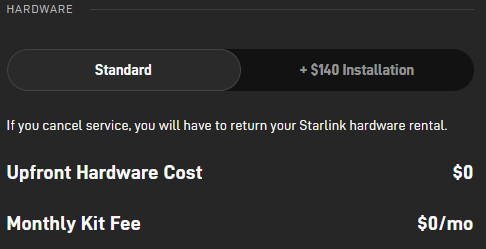
Installation:
Think I’ll choose them install it.
Date: 22/02/2026 12:32:15
From: Divine Angel
ID: 2363100
Subject: re: Anyone got Starlink internet?
Woodie said:
So let’s compare the pair.
Skymesh price – $70.71 per month – Starlink – $69 per month
Skymesh speed Supposed to be 25Mbps (get 15.1Mbps) – Starlink speed 100Mbps (supposedly) up to 300Mbps if I upgrade)
Skymesh “ping” = 687 – Starlink “ping” 22 – 28 ms
Installation:
Think I’ll choose them install it.
No worries, glad we could help 👍🏼
Date: 22/02/2026 12:38:21
From: Woodie
ID: 2363102
Subject: re: Anyone got Starlink internet?
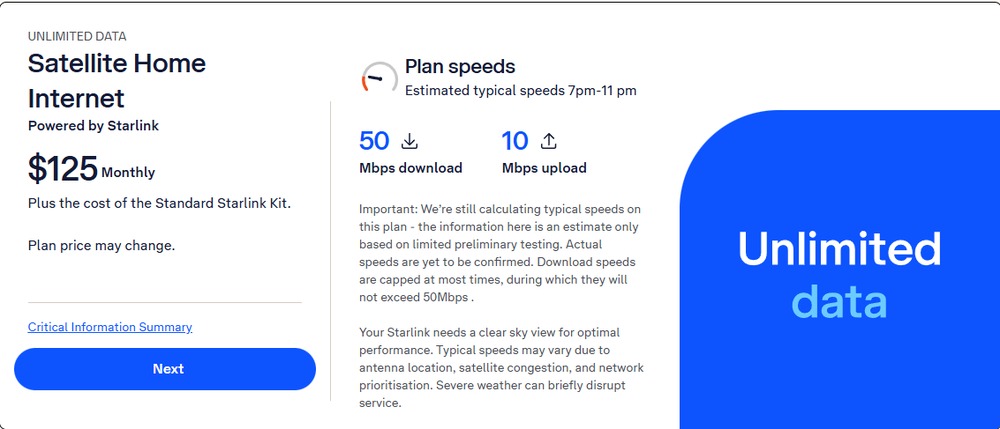
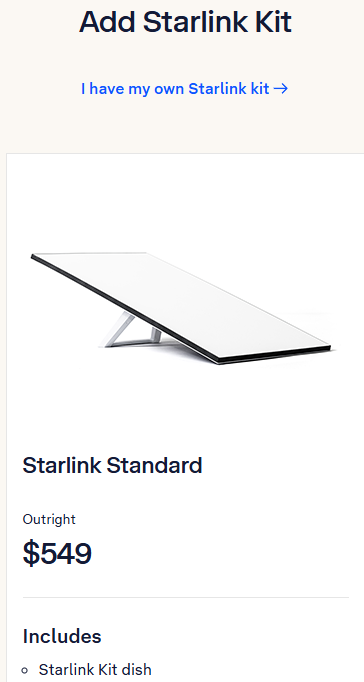
Now let’s look at Telstra’s Staklink.
Check out the plan and speed prices and have to pay for the Starlink Kit too.
I know where I’m going.
Or is there something I’ve missed with going direct to Starlink???
and
Date: 22/02/2026 12:46:10
From: roughbarked
ID: 2363109
Subject: re: Anyone got Starlink internet?
Michael V said:
Woodie said:
Selectable (mouse click on map) performance of Starlink at my address:
Download 190 – 327 Mbps (I’ll select 100Mbps)
Upload – 30 – 50 Mbps
Latency (ping) 22 – 28 ms
Sounds OK. Price is OK, too. Cheaper than Telstra.
Someone has to prop up Telstra.
Date: 22/02/2026 15:58:38
From: Ian
ID: 2363139
Subject: re: Anyone got Starlink internet?
Woodie, I assume that can’t “see” the Casino fixed wireless nbn?
Date: 22/02/2026 16:31:48
From: Woodie
ID: 2363142
Subject: re: Anyone got Starlink internet?
Ian said:
Woodie, I assume that can’t “see” the Casino fixed wireless nbn?
Starlink uses satellites, Mr Ian. If I could “see”“ ANY fixed wireless towers from here, I’d have been using them.
Date: 22/02/2026 16:43:22
From: Ian
ID: 2363143
Subject: re: Anyone got Starlink internet?
Woodie said:
Ian said:
Woodie, I assume that can’t “see” the Casino fixed wireless nbn?
Starlink uses satellites, Mr Ian. If I could “see”“ ANY fixed wireless towers from here, I’d have been using them.
Ya
Date: 27/02/2026 17:36:41
From: Woodie
ID: 2364743
Subject: re: Anyone got Starlink internet?
I’ll put it here too.
Woodie said:
FIGJAM!!!
“If you can find a lower price, we’ll beat it by 10%”
Well I did. 😁😎
This Starlink setup thingy.
I need to supply the roof mounting as there are different ones. You can just plonk the dish on the ground if you want. Anywhere you can see the sky.
I looked one up this one from Bunnings. $189. Nearest Bunnings that had one was Ballina. So bought one “click and collect”. In case I got there and they didn’t have any left.
Then I found this one $110 direct from Starlink.
I’d already bought the Bunnngs one. (click and collect).
Went to Ballina, as one does, and claimed my “If you find a cheaper price, we’ll beat it by 10%. And they did. 😎😁
They cancelled the “click and collect”, and the re-billed at $99.
$189 down to $99.
Ize recokn Ize done pretty good FIGJAM, hey what but!
PS. I’d used PayPal to buy the Bunnings one, so I now have $189 credit on my PayPal account.
PPS, The dish and router.modem are on their way, so Aus Post tell me. Free dish/modem/router.. $495 if bought separately). First month of Starlink is costing me $19 (1st month free, but a “delivery charge” for the dish/router kit.
Date: 27/02/2026 18:59:31
From: Ian
ID: 2364797
Subject: re: Anyone got Starlink internet?
Woodie said:
I’ll put it here too.
Woodie said:
FIGJAM!!!
“If you can find a lower price, we’ll beat it by 10%”
Well I did. 😁😎
This Starlink setup thingy.
I need to supply the roof mounting as there are different ones. You can just plonk the dish on the ground if you want. Anywhere you can see the sky.
I looked one up this one from Bunnings. $189. Nearest Bunnings that had one was Ballina. So bought one “click and collect”. In case I got there and they didn’t have any left.
Then I found this one $110 direct from Starlink.
I’d already bought the Bunnngs one. (click and collect).
Went to Ballina, as one does, and claimed my “If you find a cheaper price, we’ll beat it by 10%. And they did. 😎😁
They cancelled the “click and collect”, and the re-billed at $99.
$189 down to $99.
Ize recokn Ize done pretty good FIGJAM, hey what but!
PS. I’d used PayPal to buy the Bunnings one, so I now have $189 credit on my PayPal account.
PPS, The dish and router.modem are on their way, so Aus Post tell me. Free dish/modem/router.. $495 if bought separately). First month of Starlink is costing me $19 (1st month free, but a “delivery charge” for the dish/router kit.
Did they throw in a statue of Elron for you to set up in your living room?
Date: 27/02/2026 18:59:31
From: Ian
ID: 2364798
Subject: re: Anyone got Starlink internet?
Woodie said:
I’ll put it here too.
Woodie said:
FIGJAM!!!
“If you can find a lower price, we’ll beat it by 10%”
Well I did. 😁😎
This Starlink setup thingy.
I need to supply the roof mounting as there are different ones. You can just plonk the dish on the ground if you want. Anywhere you can see the sky.
I looked one up this one from Bunnings. $189. Nearest Bunnings that had one was Ballina. So bought one “click and collect”. In case I got there and they didn’t have any left.
Then I found this one $110 direct from Starlink.
I’d already bought the Bunnngs one. (click and collect).
Went to Ballina, as one does, and claimed my “If you find a cheaper price, we’ll beat it by 10%. And they did. 😎😁
They cancelled the “click and collect”, and the re-billed at $99.
$189 down to $99.
Ize recokn Ize done pretty good FIGJAM, hey what but!
PS. I’d used PayPal to buy the Bunnings one, so I now have $189 credit on my PayPal account.
PPS, The dish and router.modem are on their way, so Aus Post tell me. Free dish/modem/router.. $495 if bought separately). First month of Starlink is costing me $19 (1st month free, but a “delivery charge” for the dish/router kit.
Did they throw in a statue of Elron for you to set up in your living room?
Date: 27/02/2026 19:11:09
From: Woodie
ID: 2364801
Subject: re: Anyone got Starlink internet?
Ian said:
Woodie said:
I’ll put it here too.
Woodie said:
FIGJAM!!!
“If you can find a lower price, we’ll beat it by 10%”
Well I did. 😁😎
This Starlink setup thingy.
I need to supply the roof mounting as there are different ones. You can just plonk the dish on the ground if you want. Anywhere you can see the sky.
I looked one up this one from Bunnings. $189. Nearest Bunnings that had one was Ballina. So bought one “click and collect”. In case I got there and they didn’t have any left.
Then I found this one $110 direct from Starlink.
I’d already bought the Bunnngs one. (click and collect).
Went to Ballina, as one does, and claimed my “If you find a cheaper price, we’ll beat it by 10%. And they did. 😎😁
They cancelled the “click and collect”, and the re-billed at $99.
$189 down to $99.
Ize recokn Ize done pretty good FIGJAM, hey what but!
PS. I’d used PayPal to buy the Bunnings one, so I now have $189 credit on my PayPal account.
PPS, The dish and router.modem are on their way, so Aus Post tell me. Free dish/modem/router.. $495 if bought separately). First month of Starlink is costing me $19 (1st month free, but a “delivery charge” for the dish/router kit.
Did they throw in a statue of Elron for you to set up in your living room?
Could 3D print one, if I wanted.
From Thingyverse

Date: 27/02/2026 19:13:10
From: Ian
ID: 2364802
Subject: re: Anyone got Starlink internet?
Woodie said:
Ian said:
Woodie said:
I’ll put it here too.
Did they throw in a statue of Elron for you to set up in your living room?
Could 3D print one, if I wanted.
From Thingyverse
:)
Date: 3/03/2026 14:10:17
From: Woodie
ID: 2365868
Subject: re: Anyone got Starlink internet?
WOO HOO!!
Mr Aust Post tell me my Starlink kit is ready to pick up from the post office.
When I get home, I’ll chuck it on the lawn out the front, plug it in and see what happens. 😎😁
Watch this space………….
Date: 3/03/2026 14:18:06
From: fsm
ID: 2365872
Subject: re: Anyone got Starlink internet?
Don’t forget to move it out of the way before you mow.
Date: 3/03/2026 18:02:31
From: Woodie
ID: 2365970
Subject: re: Anyone got Starlink internet?
“Starlink is calibrating and gathering data on obstructions. This usually take about an hour.”
waiting…….. waiting………… waiting…………………
It’s giving me this rotating 3D graphic of where everything is in the sky. Sorta like Israel’s Skydome Defence bomb buster gooberlacky thingy…
Date: 3/03/2026 18:03:22
From: Bubblecar
ID: 2365971
Subject: re: Anyone got Starlink internet?
Woodie said:
“Starlink is calibrating and gathering data on obstructions. This usually take about an hour.”
waiting…….. waiting………… waiting…………………
It’s giving me this rotating 3D graphic of where everything is in the sky. Sorta like Israel’s Skydome Defence bomb buster gooberlacky thingy…
Watch out for incoming.
Date: 3/03/2026 18:05:09
From: Divine Angel
ID: 2365972
Subject: re: Anyone got Starlink internet?
Woodie said:
“Starlink is calibrating and gathering data on obstructions. This usually take about an hour.”
waiting…….. waiting………… waiting…………………
It’s giving me this rotating 3D graphic of where everything is in the sky. Sorta like Israel’s Skydome Defence bomb buster gooberlacky thingy…
Including Starlink’s own debris obstructions?
Date: 3/03/2026 18:07:11
From: Cymek
ID: 2365976
Subject: re: Anyone got Starlink internet?
Divine Angel said:
Woodie said:
“Starlink is calibrating and gathering data on obstructions. This usually take about an hour.”
waiting…….. waiting………… waiting…………………
It’s giving me this rotating 3D graphic of where everything is in the sky. Sorta like Israel’s Skydome Defence bomb buster gooberlacky thingy…
Including Starlink’s own debris obstructions?
Yeah its quite a serious worry orbital debris
Should factor in the cost of cleaning it up before it was allowed.
Date: 3/03/2026 18:09:12
From: Spiny Norman
ID: 2365979
Subject: re: Anyone got Starlink internet?
Cymek said:
Divine Angel said:
Woodie said:
“Starlink is calibrating and gathering data on obstructions. This usually take about an hour.”
waiting…….. waiting………… waiting…………………
It’s giving me this rotating 3D graphic of where everything is in the sky. Sorta like Israel’s Skydome Defence bomb buster gooberlacky thingy…
Including Starlink’s own debris obstructions?
Yeah its quite a serious worry orbital debris
Should factor in the cost of cleaning it up before it was allowed.
I image the Starlink satellites burn up completely on re-entry. Nothing should hit the ground.
Date: 3/03/2026 18:15:44
From: Woodie
ID: 2365982
Subject: re: Anyone got Starlink internet?
Divine Angel said:
Woodie said:
“Starlink is calibrating and gathering data on obstructions. This usually take about an hour.”
waiting…….. waiting………… waiting…………………
It’s giving me this rotating 3D graphic of where everything is in the sky. Sorta like Israel’s Skydome Defence bomb buster gooberlacky thingy…
Including Starlink’s own debris obstructions?
It’s drawing blue lines all over it. If I didn’t know better, one might think it’s incoming missiles.
Date: 3/03/2026 18:47:15
From: Woodie
ID: 2365986
Subject: re: Anyone got Starlink internet?
“Starlink is misaligned by 24 degrees.
FMD………..
Speed Test: (as part of the Starlink app)
92 Mbps down
62 Mbps up
Ping 22ms
WOO HOO!!! 😎😮
That’s with it just chucked on the gras out the front!!
Date: 3/03/2026 18:48:42
From: Divine Angel
ID: 2365987
Subject: re: Anyone got Starlink internet?
Woodie said:
“Starlink is misaligned by 24 degrees.
FMD………..
Speed Test: (as part of the Starlink app)
92 Mbps down
62 Mbps up
Ping 22ms
WOO HOO!!! 😎😮
That’s with it just chucked on the gras out the front!!
Heh, nice typo.
Date: 3/03/2026 18:50:45
From: Bubblecar
ID: 2365989
Subject: re: Anyone got Starlink internet?
Woodie said:
“Starlink is misaligned by 24 degrees.
FMD………..
Speed Test: (as part of the Starlink app)
92 Mbps down
62 Mbps up
Ping 22ms
WOO HOO!!! 😎😮
That’s with it just chucked on the gras out the front!!
Good going.
Date: 3/03/2026 18:51:30
From: Woodie
ID: 2365990
Subject: re: Anyone got Starlink internet?
Woodie said:
Current Skymesh speed test.
Supposed to be 25Mbps down 5Mbps up.
Note the “ping”
$70.71 per month
What I was getting. 😮
Date: 3/03/2026 18:53:27
From: Woodie
ID: 2365992
Subject: re: Anyone got Starlink internet?
Bubblecar said:
Woodie said:
“Starlink is misaligned by 24 degrees.
FMD………..
Speed Test: (as part of the Starlink app)
92 Mbps down
62 Mbps up
Ping 22ms
WOO HOO!!! 😎😮
That’s with it just chucked on the gras out the front!!
Good going.
Only got the tablet on it ATM.
Will try the laptop on the coffee table.
Will try some Iviews etc later tonight via tablet and Chromecast to the tele.
Date: 3/03/2026 19:45:01
From: Woodie
ID: 2366011
Subject: re: Anyone got Starlink internet?
Woodie said:
Current Skymesh speed test.
Supposed to be 25Mbps down 5Mbps up.
Note the “ping”
$70.71 per month
Same speed test before/after on the same laptop. $69 p/month 100Mbps down unlimited data.
Have Ize done FIGJAM?
Date: 3/03/2026 20:42:10
From: Bubblecar
ID: 2366017
Subject: re: Anyone got Starlink internet?
Woodie said:
Woodie said:
Current Skymesh speed test.
Supposed to be 25Mbps down 5Mbps up.
Note the “ping”
$70.71 per month
Same speed test before/after on the same laptop. $69 p/month 100Mbps down unlimited data.
Have Ize done FIGJAM?
FIGJAM on toast, well done.
Date: 3/03/2026 22:33:56
From: Michael V
ID: 2366074
Subject: re: Anyone got Starlink internet?
Woodie said:
Woodie said:
Current Skymesh speed test.
Supposed to be 25Mbps down 5Mbps up.
Note the “ping”
$70.71 per month
Same speed test before/after on the same laptop. $69 p/month 100Mbps down unlimited data.
Have Ize done FIGJAM?
Looks like it. The ping is surprising.
Date: 4/03/2026 00:02:39
From: Woodie
ID: 2366121
Subject: re: Anyone got Starlink internet?
Double WOO HOO!!!
Did some reading and reassurance…………..
Unplugged the cable from the Skymesh/Skymuster satellite, and plugged into the Starlnk wireless router…….
I get double NAT but speed test is the same. WOO HOO
Iview etc goes like shit out of a sling shot.🚀
So I’ve got a “new” wireless network (via Starlink router) PLUS my old household network which I’d jiggered a bit with reserved MAC addresses etc (Pi-hole, trainset, etc internal DNS server).
I’m even FIGJAMier than before!!!
Starlink Rouoter has a “bypass” function (which will disable the Starlink wireless and remove a layer of NAT. But requires a “ factory reset” to undo it.
Date: 7/03/2026 14:09:48
From: Woodie
ID: 2367233
Subject: re: Anyone got Starlink internet?
Mr Steve (Primus) has gone Starlink too. Ordered his dish kit, and they sent him TWO!!!!
Proberlee in case the first one breaks, or the dog chews it or sumfin’..
Mr Musk is handing them out to everyone for free, hey what but. .😮
Date: 7/03/2026 15:05:21
From: Woodie
ID: 2367243
Subject: re: Anyone got Starlink internet?
Still goin’ like a bought one, although I haven’t paid anything yet.
Still dumped on the grass out the front.😁
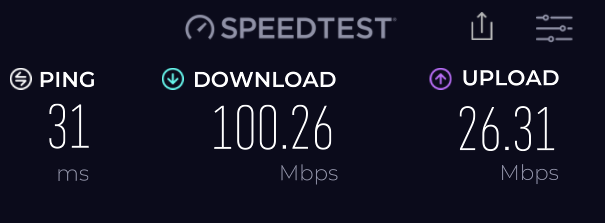
This is the fourth satellite webernets I’ve had since moving off dial-up. The first satellite was 1.5 Mbps down, 512 Kbps up.
Has come a long way since then, hey what but!! 😮
Date: 7/03/2026 15:29:54
From: Michael V
ID: 2367252
Subject: re: Anyone got Starlink internet?
Woodie said:
Mr Steve (Primus) has gone Starlink too. Ordered his dish kit, and they sent him TWO!!!!
Proberlee in case the first one breaks, or the dog chews it or sumfin’..
Mr Musk is handing them out to everyone for free, hey what but. .😮
Nice.
Is it working well?
How is the lag?
Date: 7/03/2026 16:01:04
From: Michael V
ID: 2367261
Subject: re: Anyone got Starlink internet?
Woodie said:
Still goin’ like a bought one, although I haven’t paid anything yet.
Still dumped on the grass out the front.😁
This is the fourth satellite webernets I’ve had since moving off dial-up. The first satellite was 1.5 Mbps down, 512 Kbps up.
Has come a long way since then, hey what but!! 😮
Gosh, that is good.
Date: 7/03/2026 16:10:00
From: Woodie
ID: 2367267
Subject: re: Anyone got Starlink internet?
Michael V said:
Woodie said:
Mr Steve (Primus) has gone Starlink too. Ordered his dish kit, and they sent him TWO!!!!
Proberlee in case the first one breaks, or the dog chews it or sumfin’..
Mr Musk is handing them out to everyone for free, hey what but. .😮
Nice.
Is it working well?
How is the lag?
Finger hasn’t even left the mouse button and webpage is there.😁
Where it took 5 – 7 mins to crank up an Iview and Chromecast to the tele (and get a rotten picture to boot)? Now? Open Iview on the tablet and all selections etc are instant (1 – 3 seconds) for a full list of icons. Tap what I want, and it starts the Iview within 2 secs. Tap the “cast” icon, and it playing on the tele in 3 – 4 secs. (No interruptions (buffering) and full def picture. I’m yet to try two (or more) streaming services at once. Starlink app says downloads for a single running Iview is about 3 – 5 Mbps.
Starlink app tells me the dish is still 24 degrees out of alignment, and “There is an obstruction in Starlink’s field of view, but it’s not expected to cause a noticeable impact on your service” Gunna put the full roof “pivot mount” on it later this arvo and realign it properly (while still on the ground). The dish is just laying flat on the grass ATM.
The obstruction is that tea tree out the front and that line of Cadaghi tress along the fence past the garage.
…… and I paid the $149 for installation. Go and actually book a date (online) and they want another $249 “Travel / regional loading”. 🤬 (Have to come from Chindera.)
Date: 7/03/2026 16:14:06
From: Spiny Norman
ID: 2367270
Subject: re: Anyone got Starlink internet?
Woodie said:
Michael V said:
Woodie said:
Mr Steve (Primus) has gone Starlink too. Ordered his dish kit, and they sent him TWO!!!!
Proberlee in case the first one breaks, or the dog chews it or sumfin’..
Mr Musk is handing them out to everyone for free, hey what but. .😮
Nice.
Is it working well?
How is the lag?
Finger hasn’t even left the mouse button and webpage is there.😁
Where it took 5 – 7 mins to crank up an Iview and Chromecast to the tele (and get a rotten picture to boot)? Now? Open Iview on the tablet and all selections etc are instant (1 – 3 seconds) for a full list of icons. Tap what I want, and it starts the Iview within 2 secs. Tap the “cast” icon, and it playing on the tele in 3 – 4 secs. (No interruptions (buffering) and full def picture. I’m yet to try two (or more) streaming services at once. Starlink app says downloads for a single running Iview is about 3 – 5 Mbps.
Starlink app tells me the dish is still 24 degrees out of alignment, and “There is an obstruction in Starlink’s field of view, but it’s not expected to cause a noticeable impact on your service” Gunna put the full roof “pivot mount” on it later this arvo and realign it properly (while still on the ground). The dish is just laying flat on the grass ATM.
The obstruction is that tea tree out the front and that line of Cadaghi tress along the fence past the garage.
…… and I paid the $149 for installation. Go and actually book a date (online) and they want another $249 “Travel / regional loading”. 🤬 (Have to come from Chindera.)
Quite remarkable speed and pings.
Musk also reckoned they could use a 4G phone to talk to the satellite system. I can understand how a phased array transmitter antenna could target an individual phone and transmit data to it, but I have no idea how the weak phone signal could travel 400 km up to the satellite.
Date: 7/03/2026 16:24:21
From: Woodie
ID: 2367273
Subject: re: Anyone got Starlink internet?
Michael V said:
Woodie said:
Still goin’ like a bought one, although I haven’t paid anything yet.
Still dumped on the grass out the front.😁
This is the fourth satellite webernets I’ve had since moving off dial-up. The first satellite was 1.5 Mbps down, 512 Kbps up.
Has come a long way since then, hey what but!! 😮
Gosh, that is good.
I get that on ALL devices now. Desktop, laptop, phone, tablet. Wireless or ethernet cable connected)
The modem/router that comes supplied with it, is not very good. It has limited overage, and “your wireless signal is weak” when sittin’ on the dunny. It has very limited functionality as well. No “reserved IP address” et and a lot of other stuff. I’ve plugged my old Mercursys (existing wirelss router) into it. and get full house and garge coverage now. I was getting 100 Mbps on the desktop (Ethernet cable connected) but just 24 Mbps over the Mercursys wireless.
Webernets tells me I have to put the Starlink modem into “bypass” mode to fix it. (Bull cocks I say). If I can get 100 Mpbs ethernet connected then why not wireless?
All day it took me. There a param in the Mercusys call QoS (Quality of Service). where you can limit the wireless bandwidth. It was set to 25 Mbps download. Changed that to 200 Mbps allowed over wiress, and Bob’s ya Uncle. All wireless devices connect to the Mercusys give 100 Mbps. So “bypass” mode not needed. Although I;‘m now running double NAT. But it doesn’t affect performance.
Date: 7/03/2026 16:56:16
From: Michael V
ID: 2367279
Subject: re: Anyone got Starlink internet?
Woodie said:
Michael V said:
Woodie said:
Mr Steve (Primus) has gone Starlink too. Ordered his dish kit, and they sent him TWO!!!!
Proberlee in case the first one breaks, or the dog chews it or sumfin’..
Mr Musk is handing them out to everyone for free, hey what but. .😮
Nice.
Is it working well?
How is the lag?
Finger hasn’t even left the mouse button and webpage is there.😁
Where it took 5 – 7 mins to crank up an Iview and Chromecast to the tele (and get a rotten picture to boot)? Now? Open Iview on the tablet and all selections etc are instant (1 – 3 seconds) for a full list of icons. Tap what I want, and it starts the Iview within 2 secs. Tap the “cast” icon, and it playing on the tele in 3 – 4 secs. (No interruptions (buffering) and full def picture. I’m yet to try two (or more) streaming services at once. Starlink app says downloads for a single running Iview is about 3 – 5 Mbps.
Starlink app tells me the dish is still 24 degrees out of alignment, and “There is an obstruction in Starlink’s field of view, but it’s not expected to cause a noticeable impact on your service” Gunna put the full roof “pivot mount” on it later this arvo and realign it properly (while still on the ground). The dish is just laying flat on the grass ATM.
The obstruction is that tea tree out the front and that line of Cadaghi tress along the fence past the garage.
…… and I paid the $149 for installation. Go and actually book a date (online) and they want another $249 “Travel / regional loading”. 🤬 (Have to come from Chindera.)
Good, good, good, bugger.
Date: 7/03/2026 16:59:24
From: Michael V
ID: 2367281
Subject: re: Anyone got Starlink internet?
Woodie said:
Michael V said:
Woodie said:
Still goin’ like a bought one, although I haven’t paid anything yet.
Still dumped on the grass out the front.😁
This is the fourth satellite webernets I’ve had since moving off dial-up. The first satellite was 1.5 Mbps down, 512 Kbps up.
Has come a long way since then, hey what but!! 😮
Gosh, that is good.
I get that on ALL devices now. Desktop, laptop, phone, tablet. Wireless or ethernet cable connected)
The modem/router that comes supplied with it, is not very good. It has limited overage, and “your wireless signal is weak” when sittin’ on the dunny. It has very limited functionality as well. No “reserved IP address” et and a lot of other stuff. I’ve plugged my old Mercursys (existing wirelss router) into it. and get full house and garge coverage now. I was getting 100 Mbps on the desktop (Ethernet cable connected) but just 24 Mbps over the Mercursys wireless.
Webernets tells me I have to put the Starlink modem into “bypass” mode to fix it. (Bull cocks I say). If I can get 100 Mpbs ethernet connected then why not wireless?
All day it took me. There a param in the Mercusys call QoS (Quality of Service). where you can limit the wireless bandwidth. It was set to 25 Mbps download. Changed that to 200 Mbps allowed over wiress, and Bob’s ya Uncle. All wireless devices connect to the Mercusys give 100 Mbps. So “bypass” mode not needed. Although I;‘m now running double NAT. But it doesn’t affect performance.
Fantastic.
Date: 7/03/2026 17:09:30
From: Woodie
ID: 2367284
Subject: re: Anyone got Starlink internet?
Michael V said:
Woodie said:
Michael V said:
Nice.
Is it working well?
How is the lag?
Finger hasn’t even left the mouse button and webpage is there.😁
Where it took 5 – 7 mins to crank up an Iview and Chromecast to the tele (and get a rotten picture to boot)? Now? Open Iview on the tablet and all selections etc are instant (1 – 3 seconds) for a full list of icons. Tap what I want, and it starts the Iview within 2 secs. Tap the “cast” icon, and it playing on the tele in 3 – 4 secs. (No interruptions (buffering) and full def picture. I’m yet to try two (or more) streaming services at once. Starlink app says downloads for a single running Iview is about 3 – 5 Mbps.
Starlink app tells me the dish is still 24 degrees out of alignment, and “There is an obstruction in Starlink’s field of view, but it’s not expected to cause a noticeable impact on your service” Gunna put the full roof “pivot mount” on it later this arvo and realign it properly (while still on the ground). The dish is just laying flat on the grass ATM.
The obstruction is that tea tree out the front and that line of Cadaghi tress along the fence past the garage.
…… and I paid the $149 for installation. Go and actually book a date (online) and they want another $249 “Travel / regional loading”. 🤬 (Have to come from Chindera.)
Good, good, good, bugger.
I’m thinking of “installing” it myself, and asking for my $149 back. I’ve set it up and configured it myself, which the installer would not have to do.. If it works that well plonked on the grass, it should be quite OK to mount it on the edge of the verandah roof. (far end from the front door). No need to put it on the apex of the house roof itself.
There’s no requirement to have it “installed” by some “authorised installer” for warranty or other purposes that I can find.
Date: 7/03/2026 17:15:17
From: Michael V
ID: 2367288
Subject: re: Anyone got Starlink internet?
Woodie said:
Michael V said:
Woodie said:
Finger hasn’t even left the mouse button and webpage is there.😁
Where it took 5 – 7 mins to crank up an Iview and Chromecast to the tele (and get a rotten picture to boot)? Now? Open Iview on the tablet and all selections etc are instant (1 – 3 seconds) for a full list of icons. Tap what I want, and it starts the Iview within 2 secs. Tap the “cast” icon, and it playing on the tele in 3 – 4 secs. (No interruptions (buffering) and full def picture. I’m yet to try two (or more) streaming services at once. Starlink app says downloads for a single running Iview is about 3 – 5 Mbps.
Starlink app tells me the dish is still 24 degrees out of alignment, and “There is an obstruction in Starlink’s field of view, but it’s not expected to cause a noticeable impact on your service” Gunna put the full roof “pivot mount” on it later this arvo and realign it properly (while still on the ground). The dish is just laying flat on the grass ATM.
The obstruction is that tea tree out the front and that line of Cadaghi tress along the fence past the garage.
…… and I paid the $149 for installation. Go and actually book a date (online) and they want another $249 “Travel / regional loading”. 🤬 (Have to come from Chindera.)
Good, good, good, bugger.
I’m thinking of “installing” it myself, and asking for my $149 back. I’ve set it up and configured it myself, which the installer would not have to do.. If it works that well plonked on the grass, it should be quite OK to mount it on the edge of the verandah roof. (far end from the front door). No need to put it on the apex of the house roof itself.
There’s no requirement to have it “installed” by some “authorised installer” for warranty or other purposes that I can find.
Good-oh. Hop to it. Before the week of heavy rain starts…
Date: 7/03/2026 17:19:35
From: Woodie
ID: 2367290
Subject: re: Anyone got Starlink internet?
Michael V said:
Woodie said:
Michael V said:
Good, good, good, bugger.
I’m thinking of “installing” it myself, and asking for my $149 back. I’ve set it up and configured it myself, which the installer would not have to do.. If it works that well plonked on the grass, it should be quite OK to mount it on the edge of the verandah roof. (far end from the front door). No need to put it on the apex of the house roof itself.
There’s no requirement to have it “installed” by some “authorised installer” for warranty or other purposes that I can find.
Good-oh. Hop to it. Before the week of heavy rain starts…
Gotta put a load cover and tie-downs on the on the trailer garbage (that\‘s been there since Christmas).for trip to the dump tomorrow. Trailer needs rego and pink slip by next Wednesday (Dump only open Sun & Thurs til 3pm)
Date: 9/03/2026 16:24:51
From: Woodie
ID: 2367956
Subject: re: Anyone got Starlink internet?
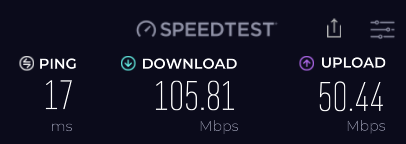
Still goin’ like a bought one.
Put the proper mounting bracket on it yesterday, and went through the alignment process again. It told me to point it to the south straight at the trees!!!
The dish is still plonked on the grass out the front.
Date: 9/03/2026 16:48:53
From: fsm
ID: 2367977
Subject: re: Anyone got Starlink internet?
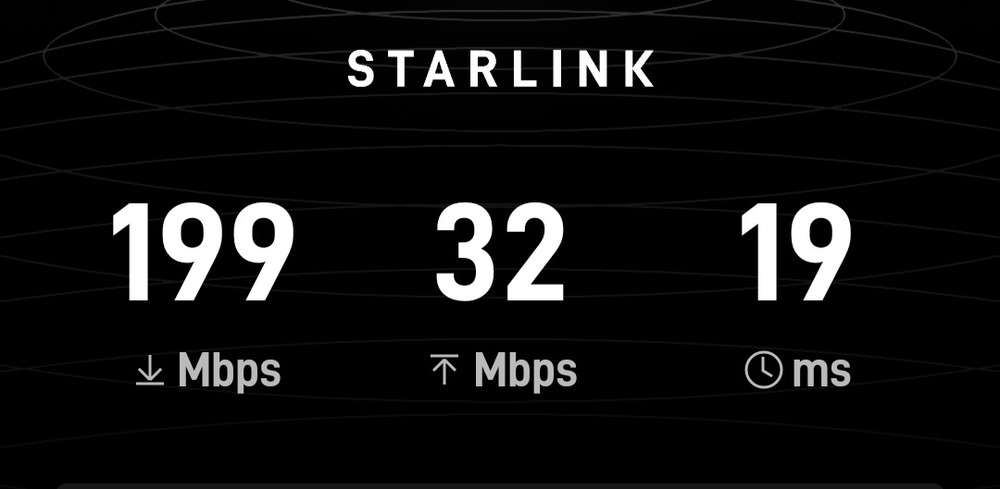
Just plugged my mini in. Not aligned yet.
Date: 9/03/2026 17:04:19
From: Woodie
ID: 2367993
Subject: re: Anyone got Starlink internet?
fsm said:
Just plugged my mini in. Not aligned yet.
I’m just a poor bloke that can only afford 100 Mbps down load. 😢
Date: 9/03/2026 17:18:23
From: fsm
ID: 2368002
Subject: re: Anyone got Starlink internet?
Woodie said:
fsm said:
Just plugged my mini in. Not aligned yet.
I’m just a poor bloke that can only afford 100 Mbps down load. 😢
I’m on the Roam – unlimited plan so that internet will be available across outback Australia.
Date: 9/03/2026 17:59:54
From: Woodie
ID: 2368027
Subject: re: Anyone got Starlink internet?
fsm said:
Woodie said:
fsm said:
Just plugged my mini in. Not aligned yet.
I’m just a poor bloke that can only afford 100 Mbps down load. 😢
I’m on the Roam – unlimited plan so that internet will be available across outback Australia.
Done some homework on Starlink ground stations. There’s about 20 in Australia. Mostly in the middle of nowhere. When I say “in the middle of nowhere”, I mean it. But right next to high capacity fibre optic links.
Such as:
Key Locations of Australian Starlink Ground Stations:
ACT: Sutton Road, Majura
NSW: Canyonleigh, Tea Gardens, Boorowa, Broken Hill, Cobargo, Calrossie, Springbrook Creek, Nabiac, Macquarie Park, Bathurst
QLD: Toonpan (Mountview Drive), Willows Siding, Bogantungan, Sellheim (Flinders Highway), Warra (Warrego Highway)
SA: Pimba (GSN#3023), Ki Ki (Ladara Bore Rd)
VIC: Anakie (Carrs Road), Koonwarra (Gwyther Siding Road), Torrumbarry (Murray Valley Highway)
WA: New Norcia Station, Geraldton (Australian Defence Satellite Communications Station), Dongara (Yarragadee), Perth (Gnangara)
eg: Pimba in SA.
Starlink Ground Station on Google Earth
Then zoom out.
Date: 9/03/2026 18:13:42
From: Woodie
ID: 2368032
Subject: re: Anyone got Starlink internet?
TIL that each Starlink beam is about “15 miles” diameter, and can only cater to 8000 connections and it will switch satellites every 4 – 6 mins..
It should be fine around here, but dense urban populations might have a problem if they all decided they wanted Starlink.
There are also lasers connections to all nearly satellites so it can get your data to the nearest ground station.
Date: 11/03/2026 12:17:25
From: fsm
ID: 2368470
Subject: re: Anyone got Starlink internet?
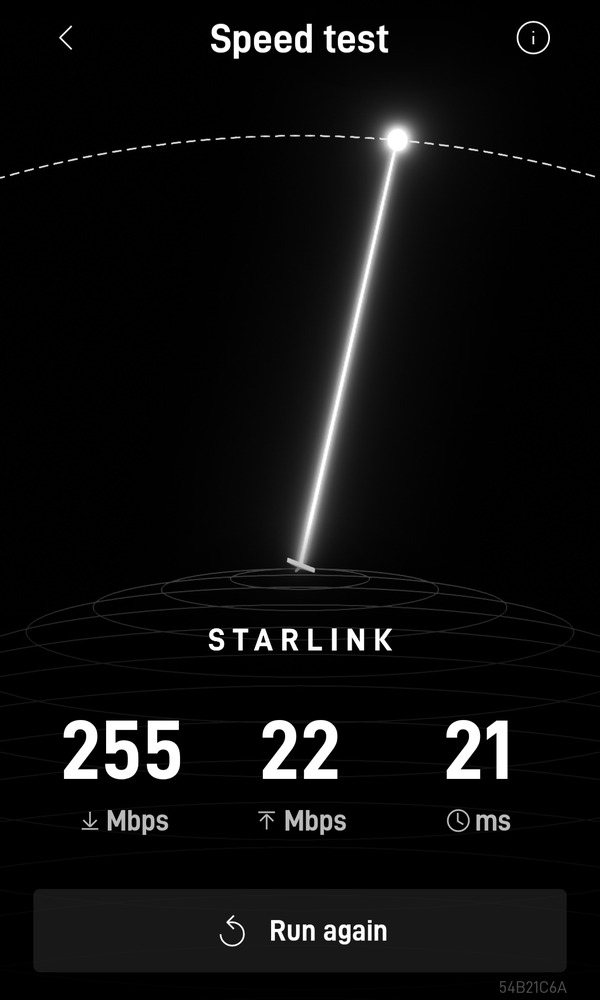
Ok, did some alignment this morning.
Date: 12/03/2026 17:04:52
From: Woodie
ID: 2368915
Subject: re: Anyone got Starlink internet?
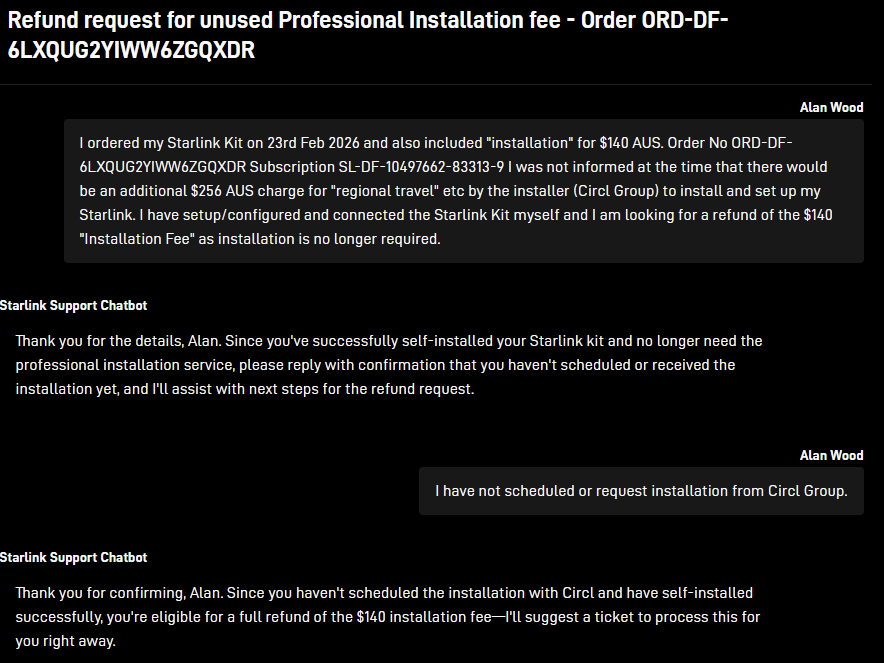
Well I’ll be fugger me bugglied. Starlink is never ceasing to amaze me.
This can only be an interaction with Starlink’s AI support “chatbot”.
The “responses” came back within 1 second of clicking the “submit”. Nobody can type THAT fast!!!! .⌨️ Even created the “ticket” title ta boot!!
I know it’s doing people out of a job, but I’m impressed. Be it Mr Musk or not. Refund provided, no questions asked (well there was one question) by the AI Chatbot..
Pity Allianz (insurance for the damaged garage) couldn’t do better than being on hold for 27 mins before the call got answered when I called them yesterday.
Date: 17/03/2026 09:39:28
From: fsm
ID: 2370563
Subject: re: Anyone got Starlink internet?
Woodie said:
fsm said:
Just plugged my mini in. Not aligned yet.
I’m just a poor bloke that can only afford 100 Mbps down load. 😢
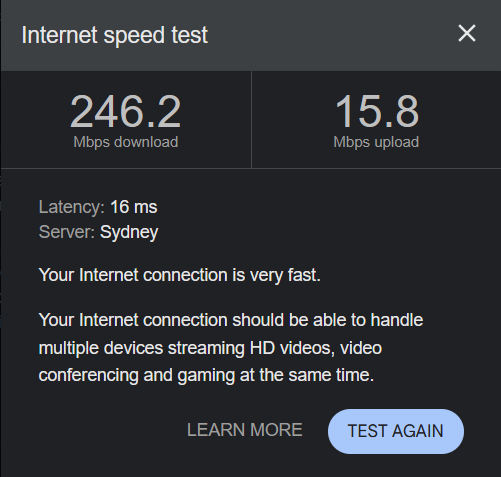
The starlink speed test is actually a bit misleading. It only tests the speed across the starlink part of the network. Other web based speed tests show a more ‘real world’ result. Regardless, starlink is quite impressive.
Date: 30/03/2026 15:23:09
From: Woodie
ID: 2374777
Subject: re: Anyone got Starlink internet?
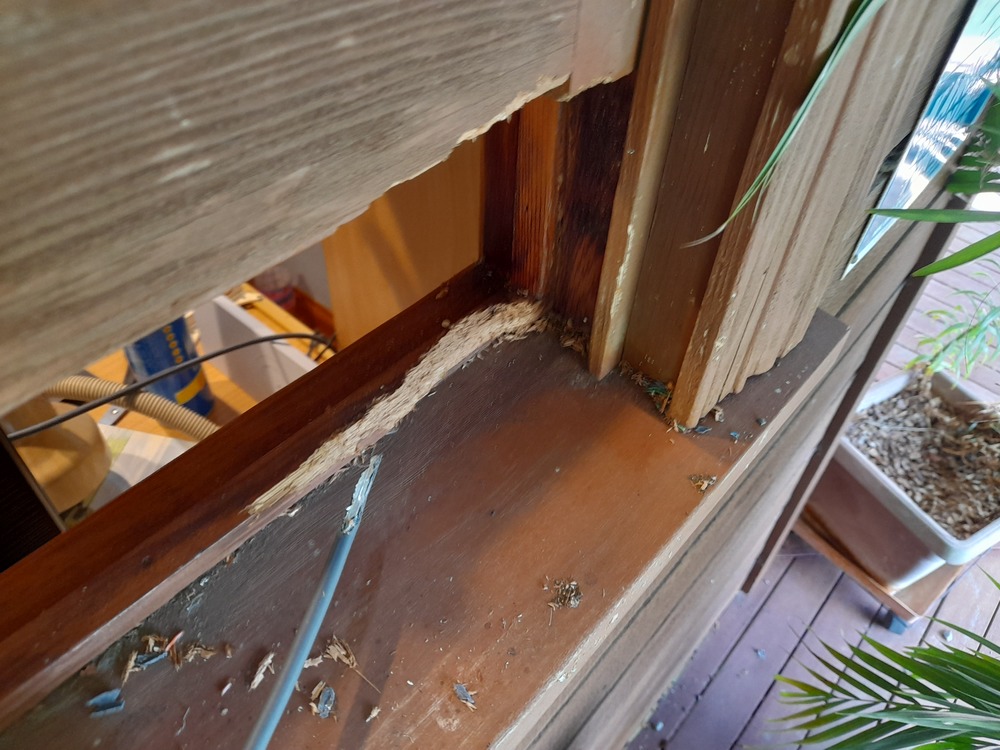
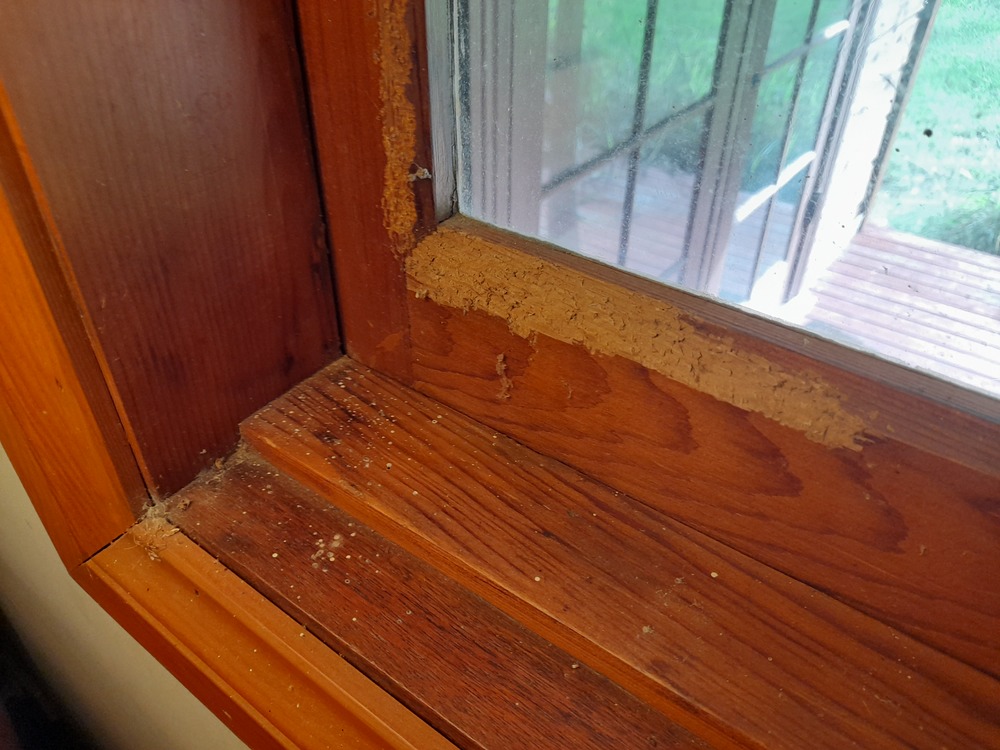
FMD…….. Something found my Starlink cable and window sill rather tasty last night . 🤬🤬🤬🤬🤬🤬
And from the outside too. The window sash was pushed down on the cable.
No bloody internet!
Lucky I’ve yet to cancel the Skymesh connection. Although it took a while to get that to work. It’s been turned off for a few weeks.
Got to get a new cable now. Amazon have then. $50. But gotta wait for it to be delivered.
Couldn’t find anywhere I could go and get one from.
Date: 30/03/2026 15:33:22
From: Peak Warming Man
ID: 2374780
Subject: re: Anyone got Starlink internet?
Woodie said:
FMD…….. Something found my Starlink cable and window sill rather tasty last night . 🤬🤬🤬🤬🤬🤬
And from the outside too. The window sash was pushed down on the cable.
No bloody internet!
Lucky I’ve yet to cancel the Skymesh connection. Although it took a while to get that to work. It’s been turned off for a few weeks.
Got to get a new cable now. Amazon have then. $50. But gotta wait for it to be delivered.
Couldn’t find anywhere I could go and get one from.
What do you reckon it was?
Date: 30/03/2026 15:36:26
From: JudgeMental
ID: 2374782
Subject: re: Anyone got Starlink internet?
Peak Warming Man said:
Woodie said:
FMD…….. Something found my Starlink cable and window sill rather tasty last night . 🤬🤬🤬🤬🤬🤬
And from the outside too. The window sash was pushed down on the cable.
No bloody internet!
Lucky I’ve yet to cancel the Skymesh connection. Although it took a while to get that to work. It’s been turned off for a few weeks.
Got to get a new cable now. Amazon have then. $50. But gotta wait for it to be delivered.
Couldn’t find anywhere I could go and get one from.
What do you reckon it was?
siberian hamster by the looks.
Date: 30/03/2026 15:37:49
From: Michael V
ID: 2374783
Subject: re: Anyone got Starlink internet?
Woodie said:
FMD…….. Something found my Starlink cable and window sill rather tasty last night . 🤬🤬🤬🤬🤬🤬
And from the outside too. The window sash was pushed down on the cable.
No bloody internet!
Lucky I’ve yet to cancel the Skymesh connection. Although it took a while to get that to work. It’s been turned off for a few weeks.
Got to get a new cable now. Amazon have then. $50. But gotta wait for it to be delivered.
Couldn’t find anywhere I could go and get one from.
‘ken bunyips!
Date: 30/03/2026 15:45:05
From: buffy
ID: 2374786
Subject: re: Anyone got Starlink internet?
Woodie said:
FMD…….. Something found my Starlink cable and window sill rather tasty last night . 🤬🤬🤬🤬🤬🤬
And from the outside too. The window sash was pushed down on the cable.
No bloody internet!
Lucky I’ve yet to cancel the Skymesh connection. Although it took a while to get that to work. It’s been turned off for a few weeks.
Got to get a new cable now. Amazon have then. $50. But gotta wait for it to be delivered.
Couldn’t find anywhere I could go and get one from.
Sorry about that. I did tell my rat to go and annoy someone else. It’s been quiet here for a couple of days…it must have taken that long for Ratty to walk to your place…
Date: 30/03/2026 15:45:09
From: Michael V
ID: 2374787
Subject: re: Anyone got Starlink internet?
Michael V said:
Woodie said:
FMD…….. Something found my Starlink cable and window sill rather tasty last night . 🤬🤬🤬🤬🤬🤬
And from the outside too. The window sash was pushed down on the cable.
No bloody internet!
Lucky I’ve yet to cancel the Skymesh connection. Although it took a while to get that to work. It’s been turned off for a few weeks.
Got to get a new cable now. Amazon have then. $50. But gotta wait for it to be delivered.
Couldn’t find anywhere I could go and get one from.
‘ken bunyips!
What type of cable?
Date: 30/03/2026 15:50:03
From: Woodie
ID: 2374788
Subject: re: Anyone got Starlink internet?
Peak Warming Man said:
Woodie said:
FMD…….. Something found my Starlink cable and window sill rather tasty last night . 🤬🤬🤬🤬🤬🤬
And from the outside too. The window sash was pushed down on the cable.
No bloody internet!
Lucky I’ve yet to cancel the Skymesh connection. Although it took a while to get that to work. It’s been turned off for a few weeks.
Got to get a new cable now. Amazon have then. $50. But gotta wait for it to be delivered.
Couldn’t find anywhere I could go and get one from.
What do you reckon it was?
That’s too much for a rat. And no rat shit. So dunno what it was.
Had the same prob a few years ago chewing the windows and architraves and cables for the TV and stereo. But that was from the inside. Did see it hop (not run) across the floor, but never really saw it full on, or caught it at the time.
Date: 30/03/2026 15:52:17
From: Woodie
ID: 2374789
Subject: re: Anyone got Starlink internet?
JudgeMental said:
Peak Warming Man said:
Woodie said:
FMD…….. Something found my Starlink cable and window sill rather tasty last night . 🤬🤬🤬🤬🤬🤬
And from the outside too. The window sash was pushed down on the cable.
No bloody internet!
Lucky I’ve yet to cancel the Skymesh connection. Although it took a while to get that to work. It’s been turned off for a few weeks.
Got to get a new cable now. Amazon have then. $50. But gotta wait for it to be delivered.
Couldn’t find anywhere I could go and get one from.
What do you reckon it was?
siberian hamster by the looks.
Filigree of course. 😁
Date: 30/03/2026 15:55:48
From: Woodie
ID: 2374791
Subject: re: Anyone got Starlink internet?
Michael V said:
Michael V said:
Woodie said:
FMD…….. Something found my Starlink cable and window sill rather tasty last night . 🤬🤬🤬🤬🤬🤬
And from the outside too. The window sash was pushed down on the cable.
No bloody internet!
Lucky I’ve yet to cancel the Skymesh connection. Although it took a while to get that to work. It’s been turned off for a few weeks.
Got to get a new cable now. Amazon have then. $50. But gotta wait for it to be delivered.
Couldn’t find anywhere I could go and get one from.
‘ken bunyips!
What type of cable?
Ethernet plugs, but “special one” for Starlink from the modem/router to the “dish”. Supplies power to the dish. As an aside, the dish also has a heater in it to melt any snow that falls on it.
Date: 30/03/2026 16:08:36
From: Woodie
ID: 2374797
Subject: re: Anyone got Starlink internet?
It seems to have happened around 4 am, according to Pi-hole logs.
Date: 30/03/2026 16:10:33
From: Woodie
ID: 2374801
Subject: re: Anyone got Starlink internet?
Proberlee won’t have the new cable til well into next week. Easter is in the way.
Date: 30/03/2026 16:11:28
From: SCIENCE
ID: 2374802
Subject: re: Anyone got Starlink internet?
so it must off been a rabbit
Date: 30/03/2026 16:24:24
From: Woodie
ID: 2374808
Subject: re: Anyone got Starlink internet?
SCIENCE said:
so it must off been a rabbit
A KIller Bunny? 2 mins

Date: 30/03/2026 16:57:05
From: Spiny Norman
ID: 2374815
Subject: re: Anyone got Starlink internet?
Woodie said:
Michael V said:
Michael V said:
‘ken bunyips!
What type of cable?
Ethernet plugs, but “special one” for Starlink from the modem/router to the “dish”. Supplies power to the dish. As an aside, the dish also has a heater in it to melt any snow that falls on it.
Careful in the colder weather with the heated dish, apparently cats like to sleep on them when the heater is running.
Date: 30/03/2026 17:03:27
From: Cymek
ID: 2374818
Subject: re: Anyone got Starlink internet?
Spiny Norman said:
Woodie said:
Michael V said:
What type of cable?
Ethernet plugs, but “special one” for Starlink from the modem/router to the “dish”. Supplies power to the dish. As an aside, the dish also has a heater in it to melt any snow that falls on it.
Careful in the colder weather with the heated dish, apparently cats like to sleep on them when the heater is running.
Breaking it or cooking the cat ?
I’ve heard of a hot dog
Date: 30/03/2026 17:03:27
From: Cymek
ID: 2374819
Subject: re: Anyone got Starlink internet?
Spiny Norman said:
Woodie said:
Michael V said:
What type of cable?
Ethernet plugs, but “special one” for Starlink from the modem/router to the “dish”. Supplies power to the dish. As an aside, the dish also has a heater in it to melt any snow that falls on it.
Careful in the colder weather with the heated dish, apparently cats like to sleep on them when the heater is running.
Breaking it or cooking the cat ?
I’ve heard of a hot dog
Date: 30/03/2026 17:19:27
From: Michael V
ID: 2374823
Subject: re: Anyone got Starlink internet?
Woodie said:
Michael V said:
Michael V said:
‘ken bunyips!
What type of cable?
Ethernet plugs, but “special one” for Starlink from the modem/router to the “dish”. Supplies power to the dish. As an aside, the dish also has a heater in it to melt any snow that falls on it.
I do have a very long ethernet cable here.
Date: 30/03/2026 17:22:08
From: roughbarked
ID: 2374826
Subject: re: Anyone got Starlink internet?
Woodie said:
FMD…….. Something found my Starlink cable and window sill rather tasty last night . 🤬🤬🤬🤬🤬🤬
And from the outside too. The window sash was pushed down on the cable.
No bloody internet!
Lucky I’ve yet to cancel the Skymesh connection. Although it took a while to get that to work. It’s been turned off for a few weeks.
Got to get a new cable now. Amazon have then. $50. But gotta wait for it to be delivered.
Couldn’t find anywhere I could go and get one from.
Rattus rattus?
Date: 30/03/2026 17:23:10
From: roughbarked
ID: 2374827
Subject: re: Anyone got Starlink internet?
JudgeMental said:
Peak Warming Man said:
Woodie said:
FMD…….. Something found my Starlink cable and window sill rather tasty last night . 🤬🤬🤬🤬🤬🤬
And from the outside too. The window sash was pushed down on the cable.
No bloody internet!
Lucky I’ve yet to cancel the Skymesh connection. Although it took a while to get that to work. It’s been turned off for a few weeks.
Got to get a new cable now. Amazon have then. $50. But gotta wait for it to be delivered.
Couldn’t find anywhere I could go and get one from.
What do you reckon it was?
siberian hamster by the looks.
‘tis hhhamster.
Date: 30/03/2026 17:27:05
From: roughbarked
ID: 2374830
Subject: re: Anyone got Starlink internet?
SCIENCE said:
so it must off been a rabbit
Could have been a non-rabbit?
Date: 30/03/2026 17:33:39
From: Michael V
ID: 2374833
Subject: re: Anyone got Starlink internet?
Woodie said:
SCIENCE said:
so it must off been a rabbit
A KIller Bunny? 2 mins
Any bones lying around?
Date: 30/03/2026 17:46:02
From: Woodie
ID: 2374838
Subject: re: Anyone got Starlink internet?
Spiny Norman said:
Woodie said:
Michael V said:
What type of cable?
Ethernet plugs, but “special one” for Starlink from the modem/router to the “dish”. Supplies power to the dish. As an aside, the dish also has a heater in it to melt any snow that falls on it.
Careful in the colder weather with the heated dish, apparently cats like to sleep on them when the heater is running.
You turn the heater on/off via the Starlink app. Plus the dish is at an 22 degree angle where a cat should slide off it. The “dish” is a flat rectangle.
Date: 30/03/2026 17:52:04
From: Woodie
ID: 2374842
Subject: re: Anyone got Starlink internet?
Michael V said:
Woodie said:
Michael V said:
What type of cable?
Ethernet plugs, but “special one” for Starlink from the modem/router to the “dish”. Supplies power to the dish. As an aside, the dish also has a heater in it to melt any snow that falls on it.
I do have a very long ethernet cable here.
Not sure if a “standard” ethernet cable would work. The “proper” cable also has a weather proof “surround” on the plug to keep and rain etc out. Plus the Starlink cable has a “lump” rather than a “clip” to secure the cable into the dish and modem.
Google tells me this:
Yes, you can use a standard, high-quality shielded CAT6 or CAT6a Ethernet cable for Starlink (specifically Gen 3/Mini), but you must address the lack of waterproofing and proprietary locking mechanisms. While Gen 3 routers support standard RJ45 connectors, using non-standard cables outdoors without proper protection may cause water damage or connection instability
Date: 30/03/2026 17:58:38
From: Woodie
ID: 2374851
Subject: re: Anyone got Starlink internet?
Michael V said:
Woodie said:
SCIENCE said:
so it must off been a rabbit
A KIller Bunny? 2 mins
Any bones lying around?
Benny Boy did bark on the verandah late evening. He never barks. Went out to check on what it was and he was shying away from something. Couldn’t see what it was.
Date: 30/03/2026 18:00:02
From: Michael V
ID: 2374852
Subject: re: Anyone got Starlink internet?
Woodie said:
Michael V said:
Woodie said:
Ethernet plugs, but “special one” for Starlink from the modem/router to the “dish”. Supplies power to the dish. As an aside, the dish also has a heater in it to melt any snow that falls on it.
I do have a very long ethernet cable here.
Not sure if a “standard” ethernet cable would work. The “proper” cable also has a weather proof “surround” on the plug to keep and rain etc out. Plus the Starlink cable has a “lump” rather than a “clip” to secure the cable into the dish and modem.
Google tells me this:
Yes, you can use a standard, high-quality shielded CAT6 or CAT6a Ethernet cable for Starlink (specifically Gen 3/Mini), but you must address the lack of waterproofing and proprietary locking mechanisms. While Gen 3 routers support standard RJ45 connectors, using non-standard cables outdoors without proper protection may cause water damage or connection instability
Righty-oh. So, I take it that that means I shouldn’t overnight-express the cable to you then.
Date: 30/03/2026 18:04:25
From: Michael V
ID: 2374857
Subject: re: Anyone got Starlink internet?
Woodie said:
Michael V said:
Woodie said:
A KIller Bunny? 2 mins
Any bones lying around?
Benny Boy did bark on the verandah late evening. He never barks. Went out to check on what it was and he was shying away from something. Couldn’t see what it was.
You need a super-dooper extra-bright torch for moments like these.
Date: 30/03/2026 18:08:23
From: Woodie
ID: 2374858
Subject: re: Anyone got Starlink internet?
Michael V said:
Woodie said:
Michael V said:
I do have a very long ethernet cable here.
Not sure if a “standard” ethernet cable would work. The “proper” cable also has a weather proof “surround” on the plug to keep and rain etc out. Plus the Starlink cable has a “lump” rather than a “clip” to secure the cable into the dish and modem.
Google tells me this:
Yes, you can use a standard, high-quality shielded CAT6 or CAT6a Ethernet cable for Starlink (specifically Gen 3/Mini), but you must address the lack of waterproofing and proprietary locking mechanisms. While Gen 3 routers support standard RJ45 connectors, using non-standard cables outdoors without proper protection may cause water damage or connection instability
Righty-oh. So, I take it that that means I shouldn’t overnight-express the cable to you then.
Taa muchly for the offer. Appreciated.
But I’ve got my old webernets connection that I haven’t yet cancelled. That’ll do til the new cable turns up. Also, I think I’ve got a long ethernet cable in a box somewhere as well.
For some odd reason, youtube won’t work with the old connection. It was fine on Starlink last night. Now gives black flashing screens forcing me to turn ad blockers off. Not sure if coincidence that Youtube has changed, or it’s going back to my old connection.
Date: 30/03/2026 18:22:42
From: Peak Warming Man
ID: 2374863
Subject: re: Anyone got Starlink internet?
Woodie said:
Michael V said:
Woodie said:
Not sure if a “standard” ethernet cable would work. The “proper” cable also has a weather proof “surround” on the plug to keep and rain etc out. Plus the Starlink cable has a “lump” rather than a “clip” to secure the cable into the dish and modem.
Google tells me this:
Yes, you can use a standard, high-quality shielded CAT6 or CAT6a Ethernet cable for Starlink (specifically Gen 3/Mini), but you must address the lack of waterproofing and proprietary locking mechanisms. While Gen 3 routers support standard RJ45 connectors, using non-standard cables outdoors without proper protection may cause water damage or connection instability
Righty-oh. So, I take it that that means I shouldn’t overnight-express the cable to you then.
Taa muchly for the offer. Appreciated.
But I’ve got my old webernets connection that I haven’t yet cancelled. That’ll do til the new cable turns up. Also, I think I’ve got a long ethernet cable in a box somewhere as well.
For some odd reason, youtube won’t work with the old connection. It was fine on Starlink last night. Now gives black flashing screens forcing me to turn ad blockers off. Not sure if coincidence that Youtube has changed, or it’s going back to my old connection.
If everybody turnud off adds for youtube it wold become disviable and have to shut down
Date: 1/04/2026 17:06:21
From: Woodie
ID: 2375403
Subject: re: Anyone got Starlink internet?
Woodie said:
Proberlee won’t have the new cable til well into next week. Easter is in the way.
That was bloody quick.😮 Ordered on 30th March, and in the letterbox today. Tracking said 8th April.
Bought via Amazon.
Date: 1/04/2026 17:08:45
From: Woodie
ID: 2375404
Subject: re: Anyone got Starlink internet?
Woodie said:
Woodie said:
Proberlee won’t have the new cable til well into next week. Easter is in the way.
That was bloody quick.😮 Ordered on 30th March, and in the letterbox today. Tracking said 8th April.
Bought via Amazon.
Suppose I’d better go plug it in.
See what chews through it this time.
Date: 1/04/2026 17:21:55
From: furious
ID: 2375411
Subject: re: Anyone got Starlink internet?
Woodie said:
Woodie said:
Woodie said:
Proberlee won’t have the new cable til well into next week. Easter is in the way.
That was bloody quick.😮 Ordered on 30th March, and in the letterbox today. Tracking said 8th April.
Bought via Amazon.
Suppose I’d better go plug it in.
See what chews through it this time.
Did you get spares?
Date: 1/04/2026 17:36:29
From: fsm
ID: 2375414
Subject: re: Anyone got Starlink internet?
Woodie said:
FMD…….. Something found my Starlink cable and window sill rather tasty last night . 🤬🤬🤬🤬🤬🤬
And from the outside too. The window sash was pushed down on the cable.
No bloody internet!
Lucky I’ve yet to cancel the Skymesh connection. Although it took a while to get that to work. It’s been turned off for a few weeks.
Got to get a new cable now. Amazon have then. $50. But gotta wait for it to be delivered.
Couldn’t find anywhere I could go and get one from.
Jaycar have a range of starlink cables.
Date: 1/04/2026 17:43:20
From: Woodie
ID: 2375418
Subject: re: Anyone got Starlink internet?
furious said:
Woodie said:
Woodie said:
That was bloody quick.😮 Ordered on 30th March, and in the letterbox today. Tracking said 8th April.
Bought via Amazon.
Suppose I’d better go plug it in.
See what chews through it this time.
Did you get spares?
Proberlee shoulda.
WOO HOO! All re-plugged back in. 😁😎
Date: 1/04/2026 17:50:04
From: Woodie
ID: 2375423
Subject: re: Anyone got Starlink internet?
fsm said:
Woodie said:
FMD…….. Something found my Starlink cable and window sill rather tasty last night . 🤬🤬🤬🤬🤬🤬
And from the outside too. The window sash was pushed down on the cable.
No bloody internet!
Lucky I’ve yet to cancel the Skymesh connection. Although it took a while to get that to work. It’s been turned off for a few weeks.
Got to get a new cable now. Amazon have then. $50. But gotta wait for it to be delivered.
Couldn’t find anywhere I could go and get one from.
Jaycar have a range of starlink cables.
It appears to be power cables for Starlink Mini only. here
Besides, Amazon delivered to the door in 2 days and I don’t have a Jaycar anywhere near here. ‘cept an “agent” in town, where you’d need to order it in.
Date: 1/04/2026 17:51:20
From: roughbarked
ID: 2375425
Subject: re: Anyone got Starlink internet?
Woodie said:
fsm said:
Woodie said:
FMD…….. Something found my Starlink cable and window sill rather tasty last night . 🤬🤬🤬🤬🤬🤬
And from the outside too. The window sash was pushed down on the cable.
No bloody internet!
Lucky I’ve yet to cancel the Skymesh connection. Although it took a while to get that to work. It’s been turned off for a few weeks.
Got to get a new cable now. Amazon have then. $50. But gotta wait for it to be delivered.
Couldn’t find anywhere I could go and get one from.
Jaycar have a range of starlink cables.
It appears to be power cables for Starlink Mini only. here
Besides, Amazon delivered to the door in 2 days and I don’t have a Jaycar anywhere near here. ‘cept an “agent” in town, where you’d need to order it in.
Delivered by courier?
Date: 1/04/2026 17:54:35
From: Woodie
ID: 2375426
Subject: re: Anyone got Starlink internet?
roughbarked said:
Woodie said:
fsm said:
Jaycar have a range of starlink cables.
It appears to be power cables for Starlink Mini only. here
Besides, Amazon delivered to the door in 2 days and I don’t have a Jaycar anywhere near here. ‘cept an “agent” in town, where you’d need to order it in.
Delivered by courier?
Nup. Australia Post.
Date: 1/04/2026 18:36:35
From: Woodie
ID: 2375436
Subject: re: Anyone got Starlink internet?
Woodie said:
For some odd reason, youtube won’t work with the old connection. It was fine on Starlink last night. Now gives black flashing screens forcing me to turn ad blockers off. Not sure if coincidence that Youtube has changed, or it’s going back to my old connection.
hmmmmmmm…… Now I’m back on the Starlink connection, The Choobs is back to what it was under Starelink.
ponders why
Date: 1/04/2026 18:46:49
From: roughbarked
ID: 2375441
Subject: re: Anyone got Starlink internet?
Woodie said:
roughbarked said:
Woodie said:
It appears to be power cables for Starlink Mini only. here
Besides, Amazon delivered to the door in 2 days and I don’t have a Jaycar anywhere near here. ‘cept an “agent” in town, where you’d need to order it in.
Delivered by courier?
Nup. Australia Post.
That’s gotta be a record.