Date: 20/10/2014 11:37:29
From: Bubblecar
ID: 612282
Subject: PC Power Supply Upgrade for Dummies
OK I’ve decided to bite the bullet and upgrade the power supply of the “new” computer, to ensure it works with the new video card – and do it all myself.
This one was recommended by CrazyNeutrino
Is that “roof-mounted” fan suitable for standard computer cases?
And is that unit likely to be compatible with this system?
And here’s the For Dummies power supply replacement article. Do they leave out anything important I need to bear in mind?
Date: 20/10/2014 11:41:10
From: poikilotherm
ID: 612285
Subject: re: PC Power Supply Upgrade for Dummies
Bubblecar said:
OK I’ve decided to bite the bullet and upgrade the power supply of the “new” computer, to ensure it works with the new video card – and do it all myself.
This one was recommended by CrazyNeutrino
Is that “roof-mounted” fan suitable for standard computer cases?
And is that unit likely to be compatible with this system?
And here’s the For Dummies power supply replacement article. Do they leave out anything important I need to bear in mind?
Ask the nerds at the store if it will fit these dimensions (from your HP website link);
Power Supply
Internal 300W (100V-240V)
Form factor: Internal ATX
Total wattage: 300W
Nominal input voltage range: 200-240V/3A (50-60Hz)
Dimensions: 150mm x 140mm x 86mm (5.9 × 5.5 × 3.4 inches)
Date: 20/10/2014 11:42:27
From: Bubblecar
ID: 612286
Subject: re: PC Power Supply Upgrade for Dummies
poikilotherm said:
Ask the nerds at the store if it will fit these dimensions (from your HP website link);
Power Supply
Internal 300W (100V-240V)
Form factor: Internal ATX
Total wattage: 300W
Nominal input voltage range: 200-240V/3A (50-60Hz)
Dimensions: 150mm x 140mm x 86mm (5.9 × 5.5 × 3.4 inches)
Good idea, ta.
Date: 20/10/2014 12:04:44
From: CrazyNeutrino
ID: 612307
Subject: re: PC Power Supply Upgrade for Dummies
All ATX power supplies are usually the same size
ATX is a standard
make notes of where all the connections go to
then its a matter of unplugging the connections from the old power supply to the motherboard and then replugging the connections from the new power supply to the motherboard
take photos of the old power supply connections if you are really unsure of things
Date: 20/10/2014 12:15:56
From: Bubblecar
ID: 612314
Subject: re: PC Power Supply Upgrade for Dummies
CrazyNeutrino said:
All ATX power supplies are usually the same size
ATX is a standard
make notes of where all the connections go to
then its a matter of unplugging the connections from the old power supply to the motherboard and then replugging the connections from the new power supply to the motherboard
take photos of the old power supply connections if you are really unsure of things
Ta Crazy. The For Dummies article suggests sticking masking tape labels on the old power supply connections for reference before unpluggling them.
Date: 21/10/2014 11:39:17
From: Bubblecar
ID: 612830
Subject: re: PC Power Supply Upgrade for Dummies
From Kyle at PC Case Gear:
Hi Nik,
The Antec True Power Classic 750W 80 Plus Gold Power Supply should be compatible in your system :-)
Regards,
Date: 21/10/2014 11:40:46
From: Peak Warming Man
ID: 612831
Subject: re: PC Power Supply Upgrade for Dummies
>>The Antec True Power Classic 750W 80 Plus Gold Power Supply
Phoaw!!
Date: 21/10/2014 11:42:59
From: Bubblecar
ID: 612837
Subject: re: PC Power Supply Upgrade for Dummies
Peak Warming Man said:
>>The Antec True Power Classic 750W 80 Plus Gold Power Supply
Phoaw!!
I’m expecting miracles.
Date: 21/10/2014 11:55:18
From: transition
ID: 612850
Subject: re: PC Power Supply Upgrade for Dummies
Should be alright, Car, be able to mount 6 × 100W Halogen auto spotlights on the tower and still run the computer. Plenty light and heating.
All good.
Date: 21/10/2014 13:23:12
From: Bubblecar
ID: 612899
Subject: re: PC Power Supply Upgrade for Dummies
I’ve decided while I’m at it I may as well boost the system ram from 6 to 8gb, and replace the integrated sound with this:
http://www.pccasegear.com/index.php?main_page=product_info&cPath=211&products_id=22196
(I’ve got a fine external Steinberg audio interface for all my music recording/creation needs, but it only works with Cubase. Games etc just use the integrated Realtek sound which isn’t great).
When you install a PCI Express sound card, does this automatically replace integrated sound, or do you have to disconnect that somehow?
Date: 21/10/2014 13:26:20
From: poikilotherm
ID: 612905
Subject: re: PC Power Supply Upgrade for Dummies
Bubblecar said:
I’ve decided while I’m at it I may as well boost the system ram from 6 to 8gb, and replace the integrated sound with this:
http://www.pccasegear.com/index.php?main_page=product_info&cPath=211&products_id=22196
(I’ve got a fine external Steinberg audio interface for all my music recording/creation needs, but it only works with Cubase. Games etc just use the integrated Realtek sound which isn’t great).
When you install a PCI Express sound card, does this automatically replace integrated sound, or do you have to disconnect that somehow?
Are you using Winblows 64bit?
Date: 21/10/2014 13:27:22
From: Bubblecar
ID: 612906
Subject: re: PC Power Supply Upgrade for Dummies
poikilotherm said:
Are you using Winblows 64bit?
Yes.
Date: 21/10/2014 13:45:53
From: CrazyNeutrino
ID: 612913
Subject: re: PC Power Supply Upgrade for Dummies
Found an article on using multiple soundcards on windows
http://www.dxlabsuite.com/winwarbler/Help/ConfiguringMultipleSoundcards.htm
Date: 21/10/2014 13:55:28
From: Bubblecar
ID: 612919
Subject: re: PC Power Supply Upgrade for Dummies
Looks like I just have to install the soundcard and choose the default device in Control Panel, Sounds. Ta Crazy.
Date: 30/10/2014 14:13:01
From: Bubblecar
ID: 618930
Subject: re: PC Power Supply Upgrade for Dummies
Is there any trick to unplugging the big 24 pin power connector from the motherboard, or do you just pull really hard? Doesn’t seem to want to budge.
Date: 30/10/2014 14:14:09
From: CrazyNeutrino
ID: 618931
Subject: re: PC Power Supply Upgrade for Dummies
Bubblecar said:
Is there any trick to unplugging the big 24 pin power connector from the motherboard, or do you just pull really hard? Doesn’t seem to want to budge.
there is clip on the side which you press in while lifting up
Date: 30/10/2014 14:14:52
From: CrazyNeutrino
ID: 618932
Subject: re: PC Power Supply Upgrade for Dummies
CrazyNeutrino said:
Bubblecar said:
Is there any trick to unplugging the big 24 pin power connector from the motherboard, or do you just pull really hard? Doesn’t seem to want to budge.
there is clip on the side which you press in while lifting up
some can be difficult as in tight
Date: 30/10/2014 14:16:11
From: party_pants
ID: 618933
Subject: re: PC Power Supply Upgrade for Dummies
Bubblecar said:
Is there any trick to unplugging the big 24 pin power connector from the motherboard, or do you just pull really hard? Doesn’t seem to want to budge.
they sually have some sort of clip that you need to squeeze in to remove.
Date: 30/10/2014 14:17:43
From: Bubblecar
ID: 618934
Subject: re: PC Power Supply Upgrade for Dummies
CrazyNeutrino said:
Bubblecar said:
Is there any trick to unplugging the big 24 pin power connector from the motherboard, or do you just pull really hard? Doesn’t seem to want to budge.
there is clip on the side which you press in while lifting up
Ta, didn’t notice that. It’s not just very tight but hard to get a grip on because of where it’s located.
Date: 30/10/2014 14:18:42
From: Bubblecar
ID: 618935
Subject: re: PC Power Supply Upgrade for Dummies
Date: 30/10/2014 14:18:51
From: Peak Warming Man
ID: 618936
Subject: re: PC Power Supply Upgrade for Dummies
This is going to be good, grabs a cold drink and some nuts.
Date: 30/10/2014 14:19:42
From: Bubblecar
ID: 618937
Subject: re: PC Power Supply Upgrade for Dummies
Bubblecar said:
May have to use pliers.
No, got it.
Date: 30/10/2014 14:22:45
From: Divine Angel
ID: 618939
Subject: re: PC Power Supply Upgrade for Dummies
Bugger. I was hoping the unfolding drama could be used in this year’s NaNoWriMo effort.
Date: 30/10/2014 14:22:45
From: Bubblecar
ID: 618940
Subject: re: PC Power Supply Upgrade for Dummies
Some of these plugs are very hard to access. It would help if I had tiny (but powerful) child labour hands instead of big man hands.
Date: 30/10/2014 14:25:14
From: Cymek
ID: 618941
Subject: re: PC Power Supply Upgrade for Dummies
Divine Angel said:
Bugger. I was hoping the unfolding drama could be used in this year’s NaNoWriMo effort.
Hopefully he’s not too weak from the 3F diet to remove the plug
Date: 30/10/2014 14:29:58
From: Bubblecar
ID: 618942
Subject: re: PC Power Supply Upgrade for Dummies
Seems to be everything unplugged. Now to unscrew and remove the power supply. Don’t hold your breath, I could be some time…
Date: 30/10/2014 14:31:34
From: CrazyNeutrino
ID: 618943
Subject: re: PC Power Supply Upgrade for Dummies
gee bublecar I went to the street to buy popcorn
glad you have it sorted
:)
Date: 30/10/2014 14:33:08
From: Cymek
ID: 618945
Subject: re: PC Power Supply Upgrade for Dummies
Bubblecar said:
Seems to be everything unplugged. Now to unscrew and remove the power supply. Don’t hold your breath, I could be some time…

Date: 30/10/2014 14:34:56
From: Bubblecar
ID: 618946
Subject: re: PC Power Supply Upgrade for Dummies
Ha, it was quick & easy. Now to get the new one in.
Date: 30/10/2014 14:37:05
From: Bubblecar
ID: 618948
Subject: re: PC Power Supply Upgrade for Dummies
Actually I’d better install the new sound card first, while there’s easier access. If there’s actually enough room for it….
Date: 30/10/2014 14:39:24
From: CrazyNeutrino
ID: 618949
Subject: re: PC Power Supply Upgrade for Dummies
just wondering with new video card
did you keep the box
there should be a 6 pin connector under the flap at the top
Date: 30/10/2014 14:45:32
From: Bubblecar
ID: 618955
Subject: re: PC Power Supply Upgrade for Dummies
No connector came with it but there are three 6 + 2 plugs with the new power supply. Would it be OK to use the 6 pin side of one of those, and just leave the 2 pin bit dangling?
Date: 30/10/2014 14:48:25
From: CrazyNeutrino
ID: 618958
Subject: re: PC Power Supply Upgrade for Dummies
Bubblecar said:
No connector came with it but there are three 6 + 2 plugs with the new power supply. Would it be OK to use the 6 pin side of one of those, and just leave the 2 pin bit dangling?
it should be ok
it should be 12 volt afaik
Date: 30/10/2014 15:13:24
From: Bubblecar
ID: 618981
Subject: re: PC Power Supply Upgrade for Dummies
OK sound card’s installed. I cleverly arranged it so it’s helping to keep smaller wires off the video card fans.
Now I just hope there’s enough room the new power supply…
Date: 30/10/2014 15:32:51
From: Bubblecar
ID: 618999
Subject: re: PC Power Supply Upgrade for Dummies
Just noticed all those 6+2 pin plugs are PCI-E. Can they be used with a PCI device (the video card)?
Date: 30/10/2014 15:36:49
From: poikilotherm
ID: 619002
Subject: re: PC Power Supply Upgrade for Dummies
Bubblecar said:
Just noticed all those 6+2 pin plugs are PCI-E. Can they be used with a PCI device (the video card)?
yes
Date: 30/10/2014 15:40:15
From: Bubblecar
ID: 619004
Subject: re: PC Power Supply Upgrade for Dummies
Ta. Now looking at the PSU online manual, there’s a 4+4 pin connector for the CPU. I’m sure I didn’t unplug such a thing from the old PSU.
Date: 30/10/2014 15:46:19
From: Bubblecar
ID: 619008
Subject: re: PC Power Supply Upgrade for Dummies
Bubblecar said:
Ta. Now looking at the PSU online manual, there’s a 4+4 pin connector for the CPU. I’m sure I didn’t unplug such a thing from the old PSU.
Doesn’t even seem to be a motherboard socket for any such plug(s).
Date: 30/10/2014 15:48:08
From: poikilotherm
ID: 619010
Subject: re: PC Power Supply Upgrade for Dummies
Bubblecar said:
Bubblecar said:
Ta. Now looking at the PSU online manual, there’s a 4+4 pin connector for the CPU. I’m sure I didn’t unplug such a thing from the old PSU.
Doesn’t even seem to be a motherboard socket for any such plug(s).
Is there an 8 pin socket on the motherboard? Plug both into that.
Date: 30/10/2014 15:52:26
From: Bubblecar
ID: 619016
Subject: re: PC Power Supply Upgrade for Dummies
poikilotherm said:
Is there an 8 pin socket on the motherboard? Plug both into that.
Just found “ATX CPU” written next to the four-pin motherboard socket I unplugged the old one from. So I just plug one of the PSU CPU 4-pins into that, and forget about the other one?
Date: 30/10/2014 15:52:52
From: CrazyNeutrino
ID: 619017
Subject: re: PC Power Supply Upgrade for Dummies
Bubblecar said:
Ta. Now looking at the PSU online manual, there’s a 4+4 pin connector for the CPU. I’m sure I didn’t unplug such a thing from the old PSU.
What mother board do you have?
Date: 30/10/2014 15:54:34
From: Bubblecar
ID: 619019
Subject: re: PC Power Supply Upgrade for Dummies
CrazyNeutrino said:
Bubblecar said:
Ta. Now looking at the PSU online manual, there’s a 4+4 pin connector for the CPU. I’m sure I didn’t unplug such a thing from the old PSU.
What mother board do you have?
Specs here:
http://h10025.www1.hp.com/ewfrf/wc/document?docname=c03527556&tmp_task=prodinfoCategory&cc=au&dlc=en&lc=en&product=5299369#N92
Date: 30/10/2014 16:04:32
From: CrazyNeutrino
ID: 619027
Subject: re: PC Power Supply Upgrade for Dummies
Bubblecar said:
poikilotherm said:
Is there an 8 pin socket on the motherboard? Plug both into that.
Just found “ATX CPU” written next to the four-pin motherboard socket I unplugged the old one from. So I just plug one of the PSU CPU 4-pins into that, and forget about the other one?
that should be the one
Date: 30/10/2014 16:08:12
From: Bubblecar
ID: 619032
Subject: re: PC Power Supply Upgrade for Dummies
Still not sure of the orientation of this PSU. It’s to be top-mounted, so should the fan face downwards? (the old one has a fan in the back, this one has a bigger one on the bottom (or top, depending on which way up it is :))
Date: 30/10/2014 16:12:06
From: CrazyNeutrino
ID: 619035
Subject: re: PC Power Supply Upgrade for Dummies
Bubblecar said:
Still not sure of the orientation of this PSU. It’s to be top-mounted, so should the fan face downwards? (the old one has a fan in the back, this one has a bigger one on the bottom (or top, depending on which way up it is :))
its ok if the fan is on the bottom
just put it in with the on off switch at the back
Date: 30/10/2014 16:29:21
From: Bubblecar
ID: 619044
Subject: re: PC Power Supply Upgrade for Dummies
Effing hell. That Dummies site says to:
Plug your new power supply into the wall before installing it, just to listen for the fan. If the fan doesn’t work, return the power supply for one that works.
So. I plugged it in and – fan no work :/
Date: 30/10/2014 16:34:31
From: sibeen
ID: 619052
Subject: re: PC Power Supply Upgrade for Dummies
I just knew that there would be a twist to this tale.
Date: 30/10/2014 16:35:25
From: esselte
ID: 619055
Subject: re: PC Power Supply Upgrade for Dummies
You plugged it in. Did you turn it on?
Switch on the wall socket on? Switch on the PSU on?
I don’t know if it’s applicable to your PSU, but mine has a feature wherein the fan wont come on until it reaches a certain temperature. This feature can be enabled and disabled by another switch on the PSU. Check to see if there is another switch.
Date: 30/10/2014 16:35:49
From: Cymek
ID: 619057
Subject: re: PC Power Supply Upgrade for Dummies
sibeen said:
I just knew that there would be a twist to this tale.
It wouldn’t be fun without it
Date: 30/10/2014 16:39:39
From: CrazyNeutrino
ID: 619062
Subject: re: PC Power Supply Upgrade for Dummies
Bubblecar said:
Effing hell. That Dummies site says to:
Plug your new power supply into the wall before installing it, just to listen for the fan. If the fan doesn’t work, return the power supply for one that works.
So. I plugged it in and – fan no work :/
no, it needs to be installed into the computer
Date: 30/10/2014 16:41:45
From: Bubblecar
ID: 619071
Subject: re: PC Power Supply Upgrade for Dummies
There’s a switch next to the plug socket with just I & O on it. I tried both but it didn’t work. I’ll leave it on for a while in case there’s a delay.
Date: 30/10/2014 16:42:30
From: Bubblecar
ID: 619075
Subject: re: PC Power Supply Upgrade for Dummies
CrazyNeutrino said:
Bubblecar said:
Effing hell. That Dummies site says to:
Plug your new power supply into the wall before installing it, just to listen for the fan. If the fan doesn’t work, return the power supply for one that works.
So. I plugged it in and – fan no work :/
no, it needs to be installed into the computer
Then why does the Dummies site say to test it before installing?
Date: 30/10/2014 16:47:45
From: furious
ID: 619087
Subject: re: PC Power Supply Upgrade for Dummies
When your computer is turned off and plugged in, the PSU does nothing. Only when turning your computer on does your PSU start up. This suggests, one of the connections to the motherboard controls the on/off of the PSU. Plugging a PSU into a wall does nothing…
Date: 30/10/2014 16:49:42
From: Bubblecar
ID: 619091
Subject: re: PC Power Supply Upgrade for Dummies
furious said:
When your computer is turned off and plugged in, the PSU does nothing. Only when turning your computer on does your PSU start up. This suggests, one of the connections to the motherboard controls the on/off of the PSU. Plugging a PSU into a wall does nothing…
Then that Dummies site must be written by dummies. Step 8 at the page below:
http://www.dummies.com/how-to/content/how-to-replace-your-desktop-pcs-power-supply.html
Date: 30/10/2014 16:50:23
From: CrazyNeutrino
ID: 619093
Subject: re: PC Power Supply Upgrade for Dummies
Bubblecar said:
CrazyNeutrino said:
Bubblecar said:
Effing hell. That Dummies site says to:
Plug your new power supply into the wall before installing it, just to listen for the fan. If the fan doesn’t work, return the power supply for one that works.
So. I plugged it in and – fan no work :/
no, it needs to be installed into the computer
Then why does the Dummies site say to test it before installing?
You can buy power supply testers
but it should work, start from scratch and go over everything again
Date: 30/10/2014 16:52:11
From: Bubblecar
ID: 619097
Subject: re: PC Power Supply Upgrade for Dummies
I’ll just install it and plug everything in and see what happens.
Date: 30/10/2014 16:55:09
From: CrazyNeutrino
ID: 619102
Subject: re: PC Power Supply Upgrade for Dummies
Bubblecar said:
I’ll just install it and plug everything in and see what happens.
cool
Date: 30/10/2014 16:55:58
From: furious
ID: 619106
Subject: re: PC Power Supply Upgrade for Dummies
- I’ll just install it and plug everything in and see what happens.
That’s how I do it…
Date: 30/10/2014 17:13:45
From: Bubblecar
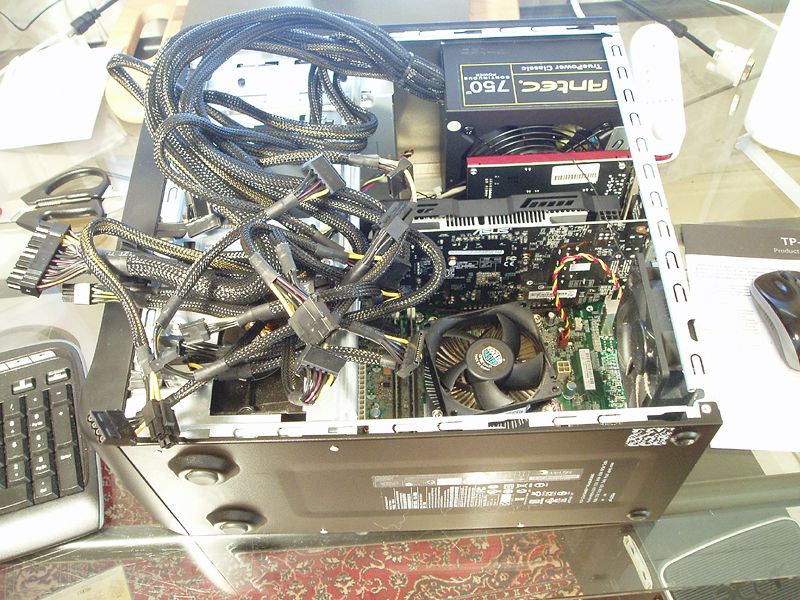
ID: 619142
Subject: re: PC Power Supply Upgrade for Dummies
How on Earth all that shite is supposed to fit in there, Christ alone knows.
Date: 30/10/2014 17:15:04
From: poikilotherm
ID: 619145
Subject: re: PC Power Supply Upgrade for Dummies
Bubblecar said:
How on Earth all that shite is supposed to fit in there, Christ alone knows.
!http://i72.photobucket.com/albums/i199/bubcar9/amess_zps61a6c7c5.jpg
stuff it into the empty drive bays. etc
Date: 30/10/2014 17:15:58
From: CrazyNeutrino
ID: 619146
Subject: re: PC Power Supply Upgrade for Dummies
Bubblecar said:
How on Earth all that shite is supposed to fit in there, Christ alone knows.
if you plug most of them in it should work
runs away
Date: 30/10/2014 17:16:29
From: CrazyNeutrino
ID: 619147
Subject: re: PC Power Supply Upgrade for Dummies
poikilotherm said:
Bubblecar said:
How on Earth all that shite is supposed to fit in there, Christ alone knows.
!http://i72.photobucket.com/albums/i199/bubcar9/amess_zps61a6c7c5.jpg
stuff it into the empty drive bays. etc
yeah, do that
Date: 30/10/2014 17:17:33
From: Bubblecar
ID: 619148
Subject: re: PC Power Supply Upgrade for Dummies
Anyway, time for a break. And a glass of wine to settle my nerves.
Date: 30/10/2014 17:18:58
From: Cymek
ID: 619151
Subject: re: PC Power Supply Upgrade for Dummies
CrazyNeutrino said:
Bubblecar said:
How on Earth all that shite is supposed to fit in there, Christ alone knows.
if you plug most of them in it should work
runs away
It looks like a Dr Who gadget
Date: 30/10/2014 17:23:59
From: Bubblecar
ID: 619152
Subject: re: PC Power Supply Upgrade for Dummies
I’m doubting that I’ll be able to get it all to bend enough to clear that DVD drive (top left).
Date: 30/10/2014 17:32:23
From: furious
ID: 619160
Subject: re: PC Power Supply Upgrade for Dummies
Did you use an Antistatic wrist strap whilst plugging things into your computer?
Date: 30/10/2014 17:34:52
From: Bubblecar
ID: 619162
Subject: re: PC Power Supply Upgrade for Dummies
furious said:
Did you use an Antistatic wrist strap whilst plugging things into your computer?
No. I don’t have one and I haven’t plugged the PSU connectors in yet anyway. I’m having a glass of wine while I think about how it’s going to be done :)
Date: 30/10/2014 17:36:34
From: transition
ID: 619164
Subject: re: PC Power Supply Upgrade for Dummies
jeeez, car, your million watt, million dollar PS has got some cabling.
Date: 30/10/2014 17:36:50
From: furious
ID: 619165
Subject: re: PC Power Supply Upgrade for Dummies
- No. I don’t have one and I haven’t plugged the PSU connectors in yet anyway.
You don’t necessarily need one but it is an alleged safe guard against doing damage to the more sensitive components…
Date: 30/10/2014 17:37:22
From: Bubblecar
ID: 619166
Subject: re: PC Power Supply Upgrade for Dummies
I’ll presumably have to cut that tie thing holding them all together near the PSU and try to fit each cable in individually. There’s no way they’ll bend around the DVD as a unit like that.
Date: 30/10/2014 17:39:15
From: furious
ID: 619169
Subject: re: PC Power Supply Upgrade for Dummies
- I’ll presumably have to cut that tie thing holding them all together near the PSU and try to fit each cable in individually. There’s no way they’ll bend around the DVD as a unit like that.
Is it upside down? It looks upside down…
Date: 30/10/2014 17:42:53
From: Bubblecar
ID: 619175
Subject: re: PC Power Supply Upgrade for Dummies
furious said:
- I’ll presumably have to cut that tie thing holding them all together near the PSU and try to fit each cable in individually. There’s no way they’ll bend around the DVD as a unit like that.
Is it upside down? It looks upside down…
The label on the other side is the right way up :)
It’s designed for top or bottom mounting, so I presume that’s the right way up for top mounting, so that the fan is pointing downwards and not just crammed against the inside of the top of the case. And the cables would have even less room up the other way.
Date: 30/10/2014 17:44:16
From: Bubblecar
ID: 619178
Subject: re: PC Power Supply Upgrade for Dummies
Bubblecar said:
And the cables would have even less room up the other way.
In fact they’d ensure it would be impossible to get the PSU in the case at all.
Date: 30/10/2014 18:04:37
From: Bubblecar
ID: 619215
Subject: re: PC Power Supply Upgrade for Dummies
Luckily I’ve only got 1.5 glasses of wine left, or I’d be tempted just put the whole sorry mess in the corner and worry about it in the morning.
Date: 30/10/2014 23:36:29
From: Bubblecar
ID: 619433
Subject: re: PC Power Supply Upgrade for Dummies
Well everything internal is reconnected and the many kms of surplus cable stuffed in and tucked into corners. Now about to put the side of the case back on, reconnect everything, turn it and see WTF happens.
Date: 30/10/2014 23:37:05
From: Bubblecar
ID: 619434
Subject: re: PC Power Supply Upgrade for Dummies
Date: 31/10/2014 00:10:49
From: Bubblecar
ID: 619437
Subject: re: PC Power Supply Upgrade for Dummies
SUCCESS!
Posting from the new pooter, which is not only working but very silently. I was worried about those extra fans etc causing a lot of noise but it’s even quieter than it was before. Now to install various software.
Date: 31/10/2014 06:44:56
From: Divine Angel
ID: 619447
Subject: re: PC Power Supply Upgrade for Dummies
Goodo. PWM can stop pacing now.
Date: 31/10/2014 10:17:00
From: Bubblecar
ID: 619516
Subject: re: PC Power Supply Upgrade for Dummies
Today: cleaning up the mess this project entailed in several rooms.
And I ought to email that PSU Replacement for Dummies site to tell them to get rid of Step 8, ‘cos it’s nonsense.
Date: 31/10/2014 10:23:26
From: transition
ID: 619520
Subject: re: PC Power Supply Upgrade for Dummies
excellent, wife thought all those cables coming from the PS looked like something out of the Borg Cube, and that you may have been assimilated.
Date: 31/10/2014 10:29:38
From: Bubblecar
ID: 619524
Subject: re: PC Power Supply Upgrade for Dummies
transition said:
excellent, wife thought all those cables coming from the PS looked like something out of the Borg Cube, and that you may have been assimilated.
Once I’d psyched myself up for it, getting it all in proved quite quick & easy.
Date: 31/10/2014 10:31:33
From: Peak Warming Man
ID: 619528
Subject: re: PC Power Supply Upgrade for Dummies
Bubblecar said:
Today: cleaning up the mess this project entailed in several rooms.
And I ought to email that PSU Replacement for Dummies site to tell them to get rid of Step 8, ‘cos it’s nonsense.
Not to dummies it’s not.
Date: 31/10/2014 11:21:26
From: Witty Rejoinder
ID: 619576
Subject: re: PC Power Supply Upgrade for Dummies
Bubblecar said:
Once I’d psyched myself up for it, getting it all in proved quite quick & easy.
giggles
Date: 31/10/2014 11:25:24
From: transition
ID: 619582
Subject: re: PC Power Supply Upgrade for Dummies
>giggles
you going to man his approach up some, witty.
Date: 31/10/2014 11:26:49
From: diddly-squat
ID: 619585
Subject: re: PC Power Supply Upgrade for Dummies
Witty Rejoinder said:
Bubblecar said:
Once I’d psyched myself up for it, getting it all in proved quite quick & easy.
giggles
It’s amazing what a bit a vass will do…
Date: 31/10/2014 11:27:44
From: Cymek
ID: 619588
Subject: re: PC Power Supply Upgrade for Dummies
Witty Rejoinder said:
Bubblecar said:
Once I’d psyched myself up for it, getting it all in proved quite quick & easy.
giggles
Shouldn’t it be more a titter than a giggle
Date: 31/10/2014 11:37:39
From: btm
ID: 619601
Subject: re: PC Power Supply Upgrade for Dummies
Bubblecar said:
Effing hell. That Dummies site says to:
Plug your new power supply into the wall before installing it, just to listen for the fan. If the fan doesn’t work, return the power supply for one that works.
So. I plugged it in and – fan no work :/
I’ve just found this. Plugging a bare PSU into a GPO and turning it on will not achieve anything, because there’s a pin on the main connector that need to be connected to ground for the PSU to turn on. From memory it’s pin 15 and can be connected to pin 4. I could check but since you’ve already found that it works there doesn’t seem to be any point.